Built-in planar domains
Use a built-in primitive when it already describes the filled material. The constructor defines the geometry and its boundary labels; meshgen.generate chooses the nodes. Lengths use your physical units and angles are radians.
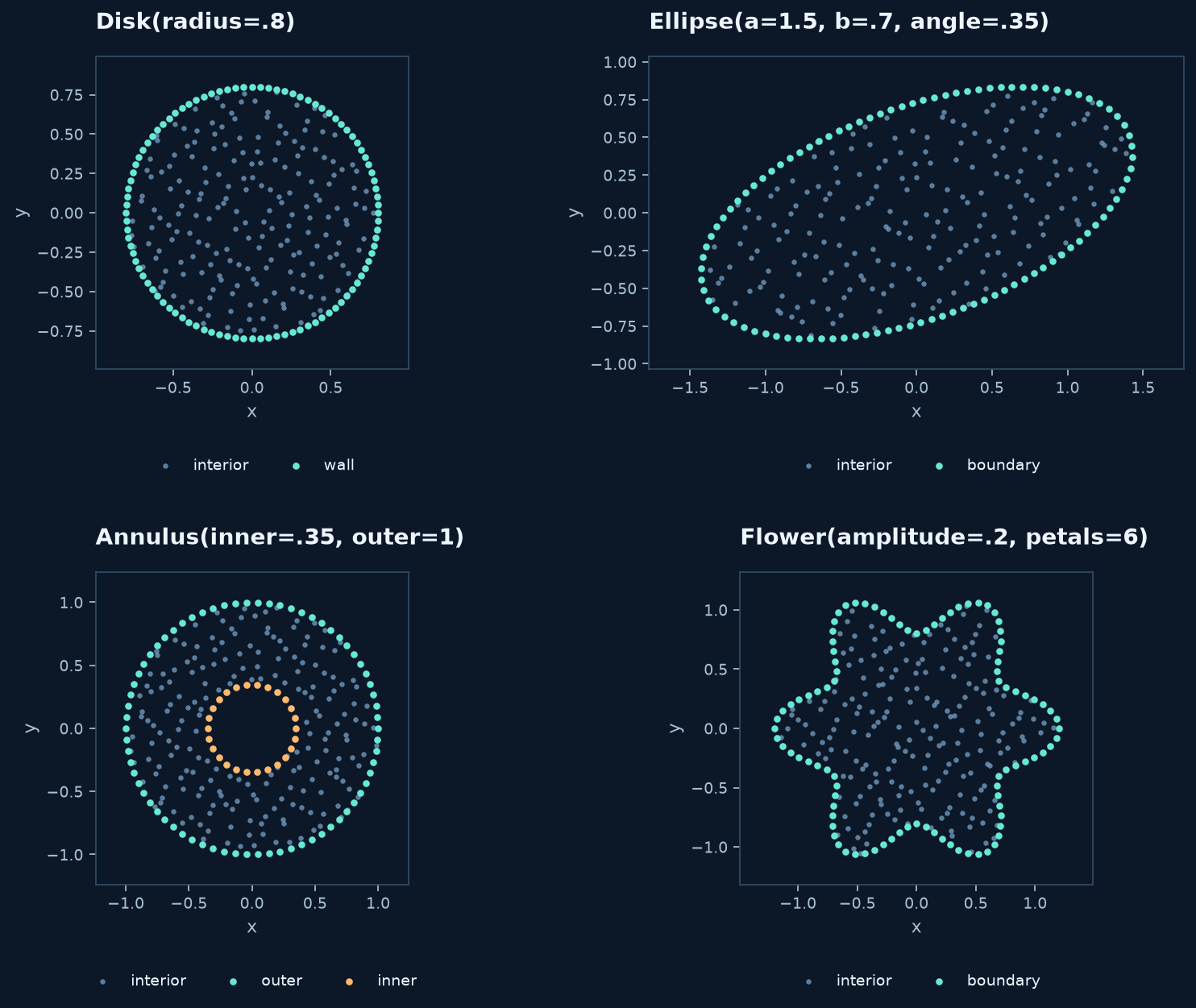
Smooth primitives
from rbflab import geometry as g, meshgen, viz

disk = g.Disk(radius=.8, center=(0., 0.), label="wall")
ellipse = g.Ellipse(a=1.5, b=.7, angle=.35)
ring = g.Annulus(inner_radius=.35, outer_radius=1.)
flower = g.Flower(radius=1., amplitude=.2, petals=6)
cloud = meshgen.generate(ellipse, interior=200, boundary=96, seed=42)
fig, ax = viz.plot_cloud(cloud)
| Constructor | Filled material | Boundary labels |
|---|---|---|
Disk(radius=1, center=(0,0), label="boundary") |
Circle interior | One perimeter label |
Ellipse(a=1.3, b=.8, center=(0,0), angle=0, labels=("boundary",)) |
Ellipse interior | One or more equal parameter-angle arcs |
Annulus(inner_radius=.4, outer_radius=1, center=(0,0)) |
Between concentric circles | inner, outer |
Flower(radius=1, amplitude=.18, petals=5, center=(0,0), label="boundary") |
Radially modulated disk | One perimeter label |
Ellipse semi-axes are a,b (not full widths); its local curve is (a cos(t), b sin(t)), rotated counterclockwise about center. The flower has r(t)=radius*(1+amplitude*cos(petals*t)); require 0 <= amplitude < 1. Larger modulation creates narrow features that need boundary and interior resolution.
Straight edges and labels
rectangle = g.Rectangle(width=2., height=1., angle=.4)
elbow = g.Polygon(
    [(0,0), (2,0), (2,.7), (.8,.7), (.8,2), (0,2)],
    labels=("base", "exit", "inner_floor", "inner_wall", "entry", "outer_wall"),
)
cloud = meshgen.generate(elbow, interior=200, boundary=120, seed=0)
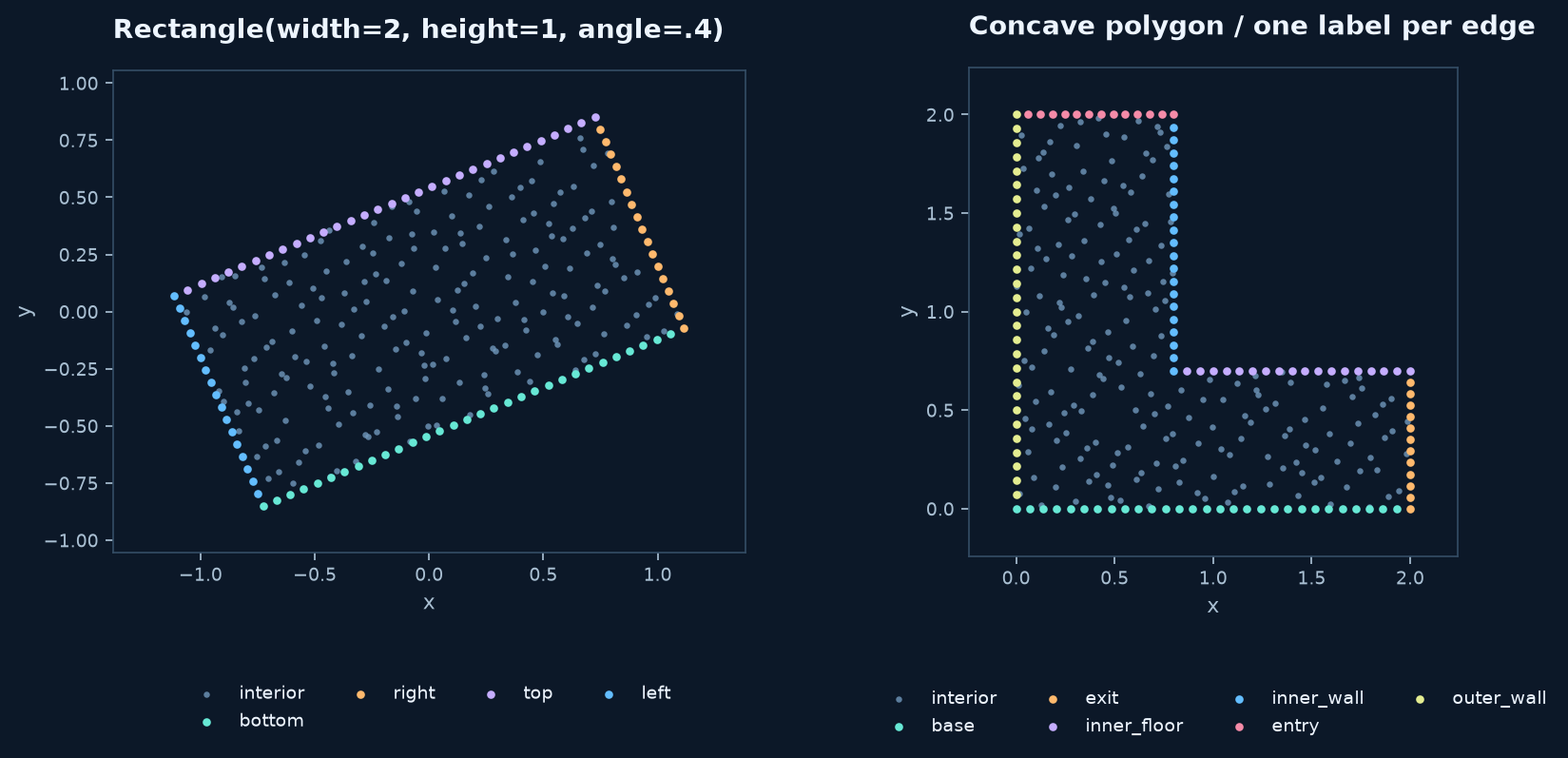
A rectangle is centered at center; its default labels bottom, right, top, left refer to its local coordinates and rotate with it. Polygon(vertices) closes the final edge to the first, supports concave simple polygons, and names edge j from vertex j to vertex j+1. Vertices may be clockwise or counterclockwise. Self-intersections, repeated non-closing vertices, and zero-area polygons are invalid.
At a corner the starting edge owns the shared point and supplies its normal. There is no averaged corner normal. Split labels where the boundary equation changes.
Add one or more holes
with_holes(outer, mapping) returns a new domain. Each mapping value is a simply connected shape to remove, and each key names that hole.
plate = g.with_holes(
    g.Rectangle(4., 2.),
    {
        "circle": g.Disk(.3, center=(-.8, 0)),
        "slot": g.Ellipse(.45, .2, center=(.7, 0), angle=.4),
    },
)
cloud = meshgen.generate(plate, interior=400, boundary=200, seed=0)
fig, ax = viz.plot_cloud(cloud, normals=True)
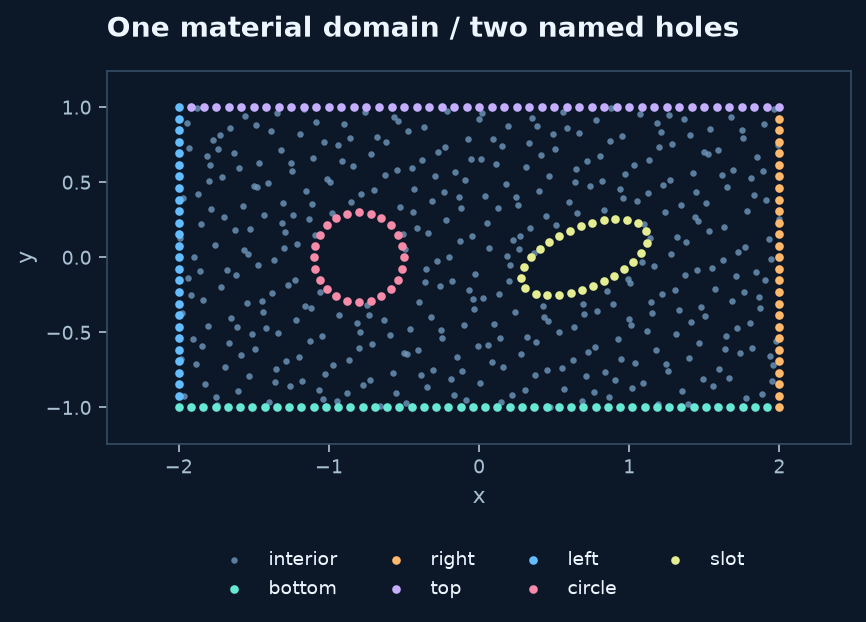
Exterior labels are preserved. A single-arc hole gets its key (circle); a multi-edge hole gets labels such as slot/edge_0. Holes must lie strictly in the material and must not touch or overlap. Normals on every hole point from material into the opening. This is a hole-composition helper, not general Boolean CAD; curved membership is polygon-approximated for composed shapes.
For exact per-label counts, use the names in domain.boundaries:
counts = {name: 40 for name in plate.boundaries}
cloud = meshgen.generate(plate, interior=400, boundary=counts, seed=0)
An integer total is allocated approximately by arc length, with at least three samples per arc. For custom curve formulas and contour construction, continue to parametric borders.