Import a connected 2D mesh from Gmsh
Use Gmsh when you need explicit triangle connectivity, its geometry tools, or its mesh-size controls. The workflow follows the boundary-first pattern familiar from finite-element tools: define labeled curves, create a surface, generate triangles, then transfer coordinates and labels. Built-in RBFLAB curve generation does not require Gmsh.
python -m pip install "rbflab[mesh,examples]"
A plate with three circular holes
The complete construction is in examples/perforated_plate.py. It defines four
straight sides, circular arcs for each hole, one plane surface, and physical curve
groups that name the boundaries.
from examples.perforated_plate import build_perforated_plate, plot_layout
from rbflab.geometry import staggered_clouds

mesh, original_node_tags = build_perforated_plate(mesh_size=.24)
layout = staggered_clouds(mesh)
plot_layout(mesh, layout, "perforated_plate.png")
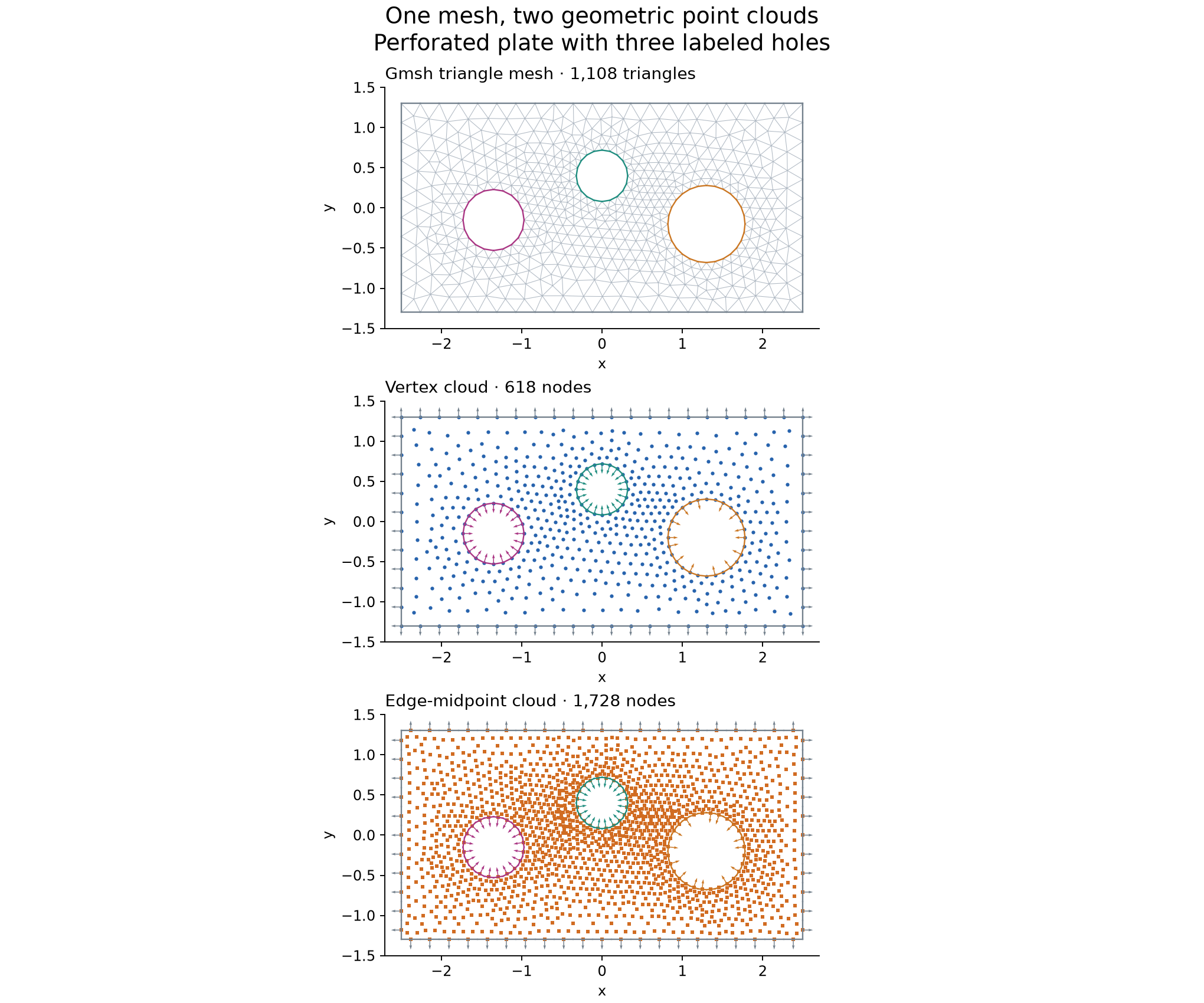
Run from a source checkout, keeping the examples directory available. This is
a geometry demonstration and does not solve a flow problem. The returned node-tag
array maps RBFLAB's zero-based coordinate rows back to Gmsh's original tags.
Import your own model
Create your geometry and first-order triangles with Gmsh, then call
meshgen.from_gmsh() while that model is active. The essentials of boundary naming are:
import gmsh
from rbflab import meshgen

# Run this after creating/synchronizing the geometry, assigning physical
# curve groups, and generating a 2D mesh in this Gmsh session.
if not gmsh.isInitialized():
    raise RuntimeError("Initialize and mesh the Gmsh model before importing")
mesh, original_node_tags = meshgen.from_gmsh()
A physical curve group can contain several curve tags; they become one boundary
label. Every exterior edge must be covered when using explicit labels. The adapter
reads an existing, synchronized model after a 2D mesh has been generated. It does
not initialize, clear, remesh or finalize the model; keep gmsh.finalize() in
the code that owns the Gmsh session, after import.
The current adapter expects first-order, three-node triangles in an XY-parallel
plane and first-order boundary lines. Construction-only points are discarded.
It reads exterior physical curves; for explicit internal-interface edge labels,
construct TriangleMesh2D with the desired interface_edges mapping.
Choose what to keep
- Keep
TriangleMesh2Dfor topology-aware work. - Use
staggered_clouds(mesh).verticesfor its vertex PointCloud. - Use
staggered_clouds(mesh).edge_midpointswhen a staggered algorithm needs that separate set of locations. See what staggering means.
The example owns and closes its Gmsh session, and refuses to replace an existing active session. Existing square/cube helpers remain available for simple tests; this chapter focuses on reusable labeled geometry.